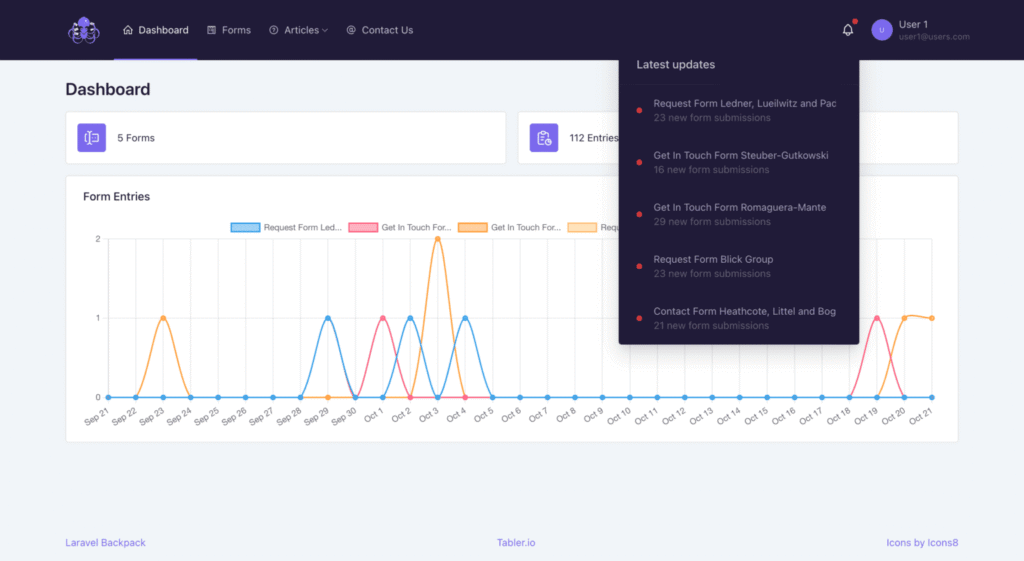
FormLogger creates a unique inbox for each of your website forms and automatically saves every submission. It uses email parsing software to gather form data, organize it, and keep a complete form log history in one place.
Easy integration with Your ecommerce platform
Shopify
BigCommerce
Webflow
InstaPage
Integration steps
Step 1: Choose your Ecommerce platform
Pick Shopify, Webflow, BigCommerce, or Instapage. Each platform connects differently, and FormLogger guides you through the correct method.
Step 2: Connect your Form Logger account
Follow the setup instructions provided for your platform. Depending on the service, integration uses either API, Webhooks, or email forwarding.
Step 3: Select forms to track
Each form gets its own unique email inbox created by FormLogger, so submissions stay separated and easy to manage.
Step 4: Configure data mapping
FormLogger extracts any data it can read from the incoming submission email. You can specify which fields matter to you (e.g., name, email, phone, message).
Step 5: Test the integration
Submit a form once to confirm that FormLogger receives the email, parses the content, and shows it inside your account.
Step 6: Go live and monitor submissions
After successful testing, FormLogger begins logging all new submissions automatically for each connected form.
Why Form Logger is the best choice for your business
Optimize your email strategy with automated parsing
FormLogger uses automated email parsing to turn every submission email into clean, structured data. This removes manual work and improves consistency in your follow-up emails.
Gain deeper customer insights through form log history
Each form gets its own inbox, giving you a complete form log history instead of scattered messages in your mailbox.
Drive business growth with accurate form data
Because FormLogger captures everything sent from your website, you get accurate form data you can rely on for campaigns, analytics, and reporting.
Save time and reduce errors using logging form automation
The built-in logging form automation removes the need to search emails or copy data manually — every submission is stored automatically.
Make smarter, data-driven decisions with consistent form history tracking
Your dashboard provides clear, reliable form history tracking, making it easy to compare performance, spot trends, and understand user behavior.
Key Features
Quick and Easy Setup
Most integrations take only a few minutes, thanks to simple connection methods used by Shopify, Webflow, BigCommerce, and Instapage.
Consistent Data Management
Every submission is parsed and stored in a structured format, keeping your data clean, searchable, and easy to export.
Secure Data Storage
All form entries are stored on DigitalOcean with HTTPS protection, ensuring reliable access and safe retention.
Integration works through unique email addresses, APIs, or Webhooks depending on the platform. Each platform (Shopify, BigCommerce, Webflow, Instapage) uses its own connection method to gather form data reliably without interfering with the storefront or checkout flow.
Any data included in the submission email can be captured: form fields, customer details, IP address, UTM parameters, source, submission date, and both structured and unstructured values. This is handled through automated email parsing, so no manual configuration is required for most forms.
Yes. Each plan includes a specific number of forms. Custom plans can include unlimited forms with custom limits.
All data can be exported in CSV format for reporting or analysis.
Yes. During the testing phase, all plans are free to use.
Data is stored on DigitalOcean (NYC1) with HTTPS protection. Email delivery currently runs without SSL. Data is not encrypted in the database to support fast search and filtering functionality typical for email parsing software.
Yes. Tracking works at the form level, which allows form history tracking across multiple websites within the same account. This is useful for teams managing several projects or domains.
Yes. Since data is extracted directly from submission emails, any language is supported.
From a few minutes (with auto-setup) up to 10–15 minutes for standard integrations. More complex cases may take longer.
Direct integration isn’t available, but you can export CSV files and use them in your analytics tools.
Yes. Support is available, and priority support is included for custom plans.
Get Started Today
Simplify form submissions management and enhance data analysis with Form Logger
Whether you have questions about setup, need troubleshooting assistance, or want more information about our features, our support team is ready to assist you.